
FamilySearch Tree
FamilySearch InternationalBooks & Reference
4.36.15K Reviews
- Version
- 5.5.0
- Installs
- 10.00M
- Age Rating
- Everyone
Screenshots

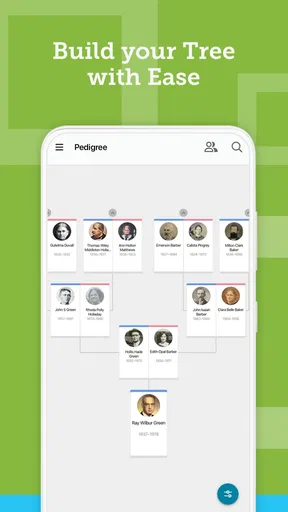
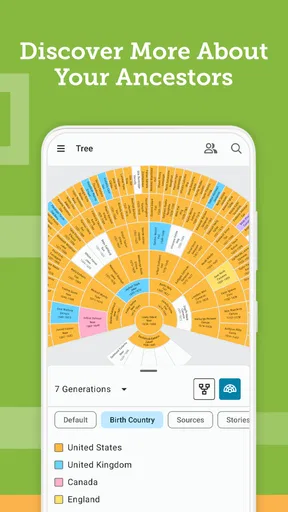
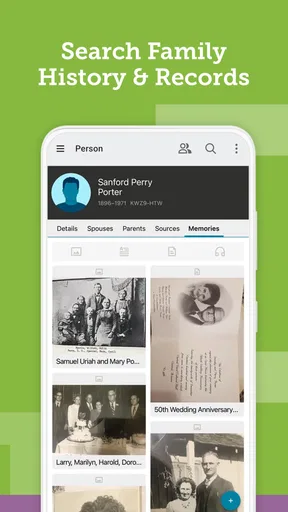
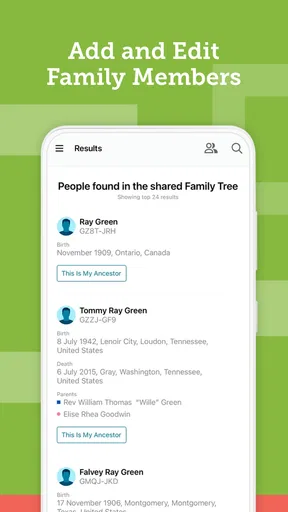
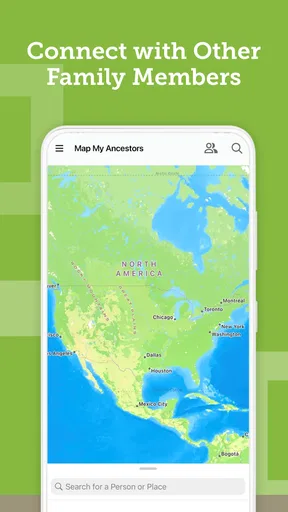
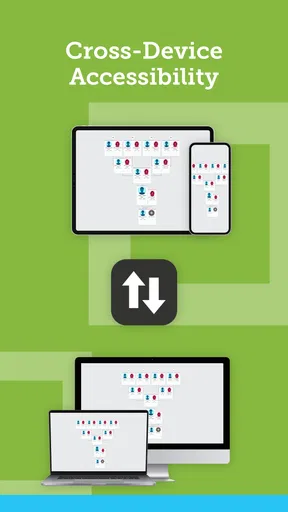

Our Review of FamilySearch Tree
 Analysis by Appyee
Family history apps often look simple until you try to connect real people, uncertain dates, and records that do not agree with one another. I spent time with FamilySearch Tree to see whether it feels like a useful research workspace or merely a digital family chart. My impression is that it is most valuable when you treat it as a shared investigation rather than a finished family album. It can help you organize clues, follow relationships, and return to research without starting from zero each time.
Developed by FamilySearch International, this free Books & Reference app is aimed at people researching ancestors and exploring their heritage. It is available for Everyone, which makes it approachable for families, students, and older relatives who may not be comfortable with specialized genealogy software. The app has reached over 10 million installs and holds a 4.4 average from around 53 thousand ratings, so it is clearly used well beyond a small group of dedicated researchers.
Where the first difficulties usually appear
The first thing I would tell a new user is not to expect instant certainty. The app can put a family tree in front of you quickly, but that does not mean every connection is correct. Genealogy depends on names, places, relationships, and records that may have been entered differently over time. A common surname can produce several plausible matches, and a familiar first name can make an incorrect suggestion look convincing.
That is where some of the initial friction comes from. A newcomer may think the task is simply to enter parents, grandparents, and great-grandparents. In practice, the harder job is deciding whether a person already in the tree is truly the same person found in a document or remembered by a relative. I found the app more useful when I slowed down and treated each connection as a claim that needed checking.
The shared nature of the tree is another important adjustment. This is not just a private notebook where every entry remains untouched by anyone else. Other contributors may have added information to the same family lines, which can save considerable time but can also introduce disagreements. If you prefer complete control over every spelling and relationship, that collaborative model may feel uncomfortable.
For a first session, I would begin with one known person rather than trying to reconstruct an entire family at once. Use a relative whose full name, approximate life period, and location are reasonably familiar. That gives you a stable starting point and makes it easier to notice when a suggested person does not fit. Starting with a vague family story usually creates more confusion than progress.
What to prepare before creating a tree
Before opening the app, gather the information you already trust: names as your family writes them, alternate spellings, places connected with births or marriages, and the names of relatives who can confirm details. Old photographs, letters, certificates, and handwritten notes can be useful even when they are incomplete. Their value is often in the small clue they provide, such as a town name or a middle name.
I also recommend separating facts from guesses in your notes. “Born in a particular county” is different from “probably born near the town where the family lived.” Keeping that distinction clear prevents a plausible assumption from quietly becoming a permanent tree entry. When the app presents a possible match, you can then compare it with your notes instead of accepting it because the name looks familiar.
A practical setup check is to confirm that you are using the intended account before adding relatives. This matters especially on a shared phone or a device that has been used by another family member. If the wrong account is open, your work may appear to have disappeared later even though it was saved somewhere else. I would also make sure the app is updated to its current version, 5.4.4, before beginning a serious session.
The minimum operating-system requirement is version 10, so older devices should be checked before troubleshooting the app itself. If installation is unavailable, the operating system may be the reason rather than a problem with your family tree. This is a simple check, but it avoids wasting time reinstalling an app that the device cannot properly support.
How I would handle a confusing first search
When a search returns several people with similar details, resist the temptation to choose the first result. Compare the whole combination of information: name, location, family members, and life events. One matching name is weak evidence; several matching details are more useful, though they still deserve a careful look.
I found it helpful to work from the known toward the unknown. Confirm a parent or grandparent first, then examine the surrounding family relationships. This approach gives each later search more context. It is also safer than jumping directly to a famous surname or a distant ancestor, where the number of possible matches can become overwhelming.
Another useful habit is to keep a short research note outside the tree while investigating. Write down what you searched, which person you considered, and why you accepted or rejected a possible connection. This is particularly valuable when several relatives share a name. Without a note, it is easy to repeat the same search or forget why a tempting result was dismissed.
Recovering when the workflow goes wrong
Many apparent problems are really workflow problems. A user may add a person, move to another screen, and later assume the change failed because the family view looks different from what they expected. In that situation, I would first return to the person’s profile and inspect the relationship from there rather than immediately deleting and recreating the entry. Genealogy screens can show the same family from different starting points, and a changed view is not automatically lost work.
If a search seems empty, check the spelling and the level of detail being used. Historical records can contain variations in names, translated place names, or abbreviated forms. Try a broader search first, then narrow it with information you can defend. Entering too many uncertain details can exclude a useful result; entering too few can produce a long list that takes patience to evaluate.
When a relationship looks wrong, I would avoid making several corrective edits at once. Change one connection, review the surrounding family, and then continue. Small, reversible steps make it easier to identify which action caused the unexpected result. They also reduce the risk of correcting one visible problem while creating another elsewhere in the tree.
A particularly important recovery technique is to pause before merging similar people. Two records may share a name and approximate dates but still represent different individuals. Compare spouses, children, locations, and other available context. If the evidence is weak, keeping the people separate is usually less damaging than combining them and spreading the wrong relationship through several generations.
For everyday use, I would divide research into short sessions with a clear goal. For example, one evening might focus only on confirming a great-grandparent’s parents, while another session examines a particular location. This prevents the app from becoming an endless chain of attractive hints. It also leaves you with a clear stopping point and a better idea of what to investigate next.
A realistic family-research routine
Imagine that a relative gives you a photograph labeled with a surname and a town, but no date. I would start by creating or locating the known family member connected to that photograph. Then I would use the town as a clue, compare possible relatives, and record why a candidate seems plausible. If the candidate has a different spouse or a child who does not fit the family story, I would leave the connection unresolved rather than forcing it.
Later, another relative might remember a middle name or a nearby village. That small detail can change the search dramatically. The app becomes useful here because the tree gives you a place to attach new clues and see which relationships need attention. The important point is that the tree supports the investigation; it does not replace the judgment needed to evaluate family evidence.
This workflow also works well for a family gathering. Instead of asking relatives to remember an entire lineage, show them one person or one relationship at a time and ask focused questions. A conversation about whether someone lived in one town or another is often more productive than a broad request to “tell me everything about the family.”
When the app is not the cause
Not every missing result or unusual screen means the application is broken. A weak internet connection, an account mix-up, an outdated operating system, or a mistaken search spelling can all look like app failure. My first troubleshooting sequence would be simple: confirm the account, check the connection, verify the device meets the requirement, close and reopen the app, and repeat the search with fewer assumptions.
If only one person or relationship looks unusual, the issue is more likely related to the underlying family information than to the entire application. Compare the same details from another starting point in the tree and review the names and dates you entered. If the whole app behaves strangely, basic device troubleshooting is more appropriate than repeatedly editing family records.
There is also a human source of difficulty: family memories can conflict. Two relatives may remember the same person’s birth year differently, and both may be sincere. In that case, the best response is not to choose the most confident speaker. Keep the uncertainty visible in your own notes and look for supporting records or additional family evidence before treating one version as settled.
The app is less suitable for someone who wants a polished, private family-history presentation with no research process. It is also not the best fit for a person who dislikes shared contributions or who expects every suggested connection to be automatically reliable. A dedicated desktop genealogy program may be preferable for users who need extensive personal control, detailed offline organization, or a more specialized workspace.
On the other hand, a general notes app is a weaker substitute when relationships are the main thing you need to understand. Notes can hold names and stories, but they do not give the same family-tree context. A spreadsheet can be flexible, yet it requires you to design and maintain the structure yourself. FamilySearch Tree sits between those options: more organized than loose notes, but more collaborative and evidence-dependent than a private manual record.
Who will get the most from it
I would recommend it to beginners who want a guided starting point, relatives working together, and curious users who have a few family clues but no established research system. It is especially useful when you want to move between a person and the surrounding relationships rather than read isolated notes. The free price also makes experimentation easier for families who are not ready to commit to a paid genealogy service.
It can also suit experienced researchers as a convenient companion for checking family connections and keeping a shared line organized. However, experienced users should still maintain their own research discipline. The app’s convenience does not remove the need to verify evidence, distinguish people with similar names, or preserve reasons for important decisions.
The Everyone content rating makes it appropriate for family use, including introducing younger relatives to their heritage. I would still guide children through the difference between a documented fact and an attractive possibility. That lesson is more important than simply filling the tree with as many names as possible.
My practical verdict
After using it as a research tool rather than a genealogy shortcut, I came away positive. FamilySearch Tree is strongest when you use it to organize questions, compare relationships, and collaborate carefully with relatives. Its greatest weakness is the same feature that gives it reach: a shared tree can contain disagreements, duplicates, and information that needs checking.
The app has been available since July 15, 2014, and its current version is 5.4.4. Those details matter less to me than the way it fits into a real routine: start with a known person, check the account and device first, search broadly before narrowing, and make one careful change at a time. Those habits prevent most beginner frustration.
At no cost, it is an easy app to try if you want to explore your family history without building a system from scratch. I would skip it if your priority is a completely private database, advanced personal control, or a finished presentation rather than ongoing research. For everyone else, I think it is worth installing with realistic expectations: use the tree as a map of evidence and questions, not as automatic proof of your ancestry.
Privacy and Permissions
See what permissions an app requests and how it handles your data.
- Location
- approximate location (network-based), precise location (GPS and network-based)
- Photos/Media/Files
- read the contents of your USB storage, modify or delete the contents of your USB storage
- Storage
- read the contents of your USB storage, modify or delete the contents of your USB storage
- Camera
- take pictures and videos
- Microphone
- record audio
- Other
- view network connections, full network access, run at startup, reorder running apps, prevent device from sleeping, Google Play license check
Verdict
Strengths of FamilySearch Tree
- Free access to extensive genealogy records and family trees.
- Useful collaboration tools for sharing research with relatives.
- Supports photos, documents, stories, and audio memories.
- Search tools help discover ancestors across multiple record collections.
- Available on Android and iOS with data syncing across devices.
Limitations of FamilySearch Tree
- Some records require a free account and may have access restrictions.
- User-submitted family tree information can contain errors or duplicates.
- Historical records may be incomplete, poorly scanned, or hard to read.
- The interface can feel overwhelming for first-time genealogy researchers.
- Some features depend on an internet connection and online record access.
Similar Picks in This Category
View All
Google Play Books & Audiobooks
Google LLC4.7

네이버 - NAVER
NAVER Corp.3.5

Wattpad - Read & Write Stories
Wattpad.com3.7

King James Bible - Verse+Audio
Ozion4.8

Bible Offline-KJV Holy Bible
Bíblia Offline4.9

Amazon Kindle: Reading App
Amazon Mobile LLC4.8
Frequently Asked Questions
What is FamilySearch Tree, and what can I do with it?
FamilySearch Tree is a genealogy app for building and exploring a shared family tree. After creating an account, you can add relatives, record names, dates, places, photos, stories, documents, and other historical details. The app also lets you search historical records and connect your findings to people in your tree, making it useful for both beginners and experienced family-history researchers.
Is FamilySearch Tree free to download and use?
Yes, FamilySearch Tree is generally free to download and use on Android and iOS devices. Many family-tree tools, historical records, and research features are available without a subscription. However, some linked services, partner websites, records, or specialized resources may have their own restrictions or fees. An account is required, so users should review the current terms and privacy information before adding personal or family data.
Can other people edit my family tree in FamilySearch Tree?
FamilySearch Tree uses a shared family-tree model, which means multiple users may contribute information about the same deceased ancestors. You can review changes, see contributor details, compare sources, and sometimes restore earlier information if an error is made. This collaborative approach can reveal valuable discoveries, but it also means you should verify dates, relationships, and documents rather than assuming every existing entry is accurate.
Does FamilySearch Tree work offline?
The app can provide access to some previously viewed information and may allow certain details to be prepared while you are offline, but many important functions require an internet connection. Searching historical records, synchronizing changes, opening new sources, and viewing online family-tree information generally depend on connectivity. If you plan to research in archives or cemeteries, download or save essential information beforehand and synchronize your work later.
Is my personal and family information safe in FamilySearch Tree?
FamilySearch Tree includes privacy controls and treats living-person information differently from information about deceased relatives. Details about living people are generally restricted, while information about deceased ancestors can be visible to other contributors depending on the record and settings. Even so, users should avoid entering unnecessary sensitive information, read the privacy policy, use a strong password, and carefully consider what they upload publicly.
